
Enconcept MyCoach1.3.3 - App Store
You'll be able to see results in few seconds.
Publisher Description
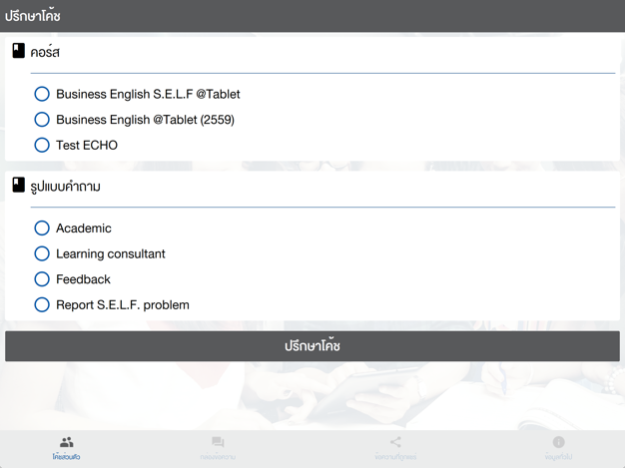
***For Enconcept and SociThai students only***
MyCoach
ถาม-ตอบทันใจ เหมือนมีโค้ชอยู่ใกล้ตัว
Quick response & Clear coaching in your hand!
MyCoach is always there whenever you have questions for your academic coach. Through MyCoach system, all question or concern in your learning will be advised by your trusted coach. This is the ultimate tool for students to fully understand all content in their courses.
MyCoach คือ Application พิเศษสำหรับนักเรียน Enconcept และ SociThai เสมือนมีคุณครูหรือโค้ชคอยให้คำปรึกษา พร้อมตอบทุกปัญหาอย่างใกล้ชิดทุกที่ทุกเวลา ผ่านการดูแลโดยทีมติวเตอร์ ทีมวิชาการที่มีความเชี่ยวชาญเฉพาะ คอยดูแล และตอบข้อสงสัยในทุกๆ ปัญหา กุญแจสู่ความเข้าใจเนื้อหาบทเรียนอยู่พร้อมในอุปกรณ์พกพา
Feature
- text to ask their coach
- attach image to a discussion to give more detail
- 3 categories of discussions; Academic, Personal, and Feedback
ฟังก์ชั่นการใช้งาน
- ส่งคำถาม/ปัญหาถึงโค้ช
- สามารถแนบไฟล์รูปเพื่อส่งให้โค้ชได้
- หัวข้อประเภทคำถาม มี 3 ประเภท ดังนี้ คำถามวิชาการในแบบเรียน, คำถามจากผู้เรียน และข้อเสนอแนะอื่นๆ รวมถึง feedback ต่อโค้ช
Keywords : MyCoach, Communication, Coach, Tutor, Education, Classroom, S.E.L.F.100%, Enconcept ,Consult , XeerSoft, Learnbalance, Chat, Student question ,S.E.L.F. Revolution, SociThai, InterPass
Sep 19, 2016
Version 1.3.3
This app has been updated by Apple to display the Apple Watch app icon.
-Able to login by MySELF
About Enconcept MyCoach
The company that develops Enconcept MyCoach is XeerSoft Thailand Co,Ltd.. The latest version released by its developer is 1.3.3.
To install Enconcept MyCoach on your iOS device, just click the green Continue To App button above to start the installation process. The app is listed on our website since 2016-09-19 and was downloaded 0 times. We have already checked if the download link is safe, however for your own protection we recommend that you scan the downloaded app with your antivirus. Your antivirus may detect the Enconcept MyCoach as malware if the download link is broken.
How to install Enconcept MyCoach on your iOS device:
- Click on the Continue To App button on our website. This will redirect you to the App Store.
- Once the Enconcept MyCoach is shown in the iTunes listing of your iOS device, you can start its download and installation. Tap on the GET button to the right of the app to start downloading it.
- If you are not logged-in the iOS appstore app, you'll be prompted for your your Apple ID and/or password.
- After Enconcept MyCoach is downloaded, you'll see an INSTALL button to the right. Tap on it to start the actual installation of the iOS app.
- Once installation is finished you can tap on the OPEN button to start it. Its icon will also be added to your device home screen.
Program Details
System requirements
Download information
Pricing
Version History
version 1.3.3
posted on 2016-09-19
Sep 19, 2016
Version 1.3.3
This app has been updated by Apple to display the Apple Watch app icon.
-Able to login by MySELF
version 1.3.3
posted on 2016-09-19
Sep 19, 2016 Version 1.3.3
This app has been updated by Apple to display the Apple Watch app icon.
-Able to login by MySELF
version 1.3.3
posted on 2016-09-19
Sep 19, 2016 Version 1.3.3
This app has been updated by Apple to use the latest Apple signing certificate.
-Able to login by MySELF
version 1.3.3
posted on 2016-09-19
Sep 19, 2016 Version 1.3.3
-Able to login by MySELF
version 1.3.3
posted on 2013-03-09
version 1.3.3
posted on 1970-01-01
2016年9月19日 Version 1.3.3
-Able to login by MySELF
Disclaimer
Official App Store Link
We do not host Enconcept MyCoach on our servers. We did not scan it for viruses, adware, spyware or other type of malware. This app is hosted by Apple and passed their terms and conditions to be listed there. We recommend caution when installing it.
The App Store link for Enconcept MyCoach is provided to you by apps112.com without any warranties, representations or guarantees of any kind, so access it at your own risk.
If you have questions regarding this particular app contact the publisher directly. For questions about the functionalities of apps112.com contact us.
